Win back time in your working day – Excel, Word and PowerPoint from scratch, step by step
Shortcuts, templates and a handful of well-chosen formulas can do the slow, fiddly jobs for you. This collection of three books starts with the basics and walks you through real office tasks: your first VLOOKUP, your first pivot table, a report with a table of contents that updates itself.

Excel, Word & PowerPoint 2026 from Scratch: 3 Books for the Price of 1
BUY 1, GET 3
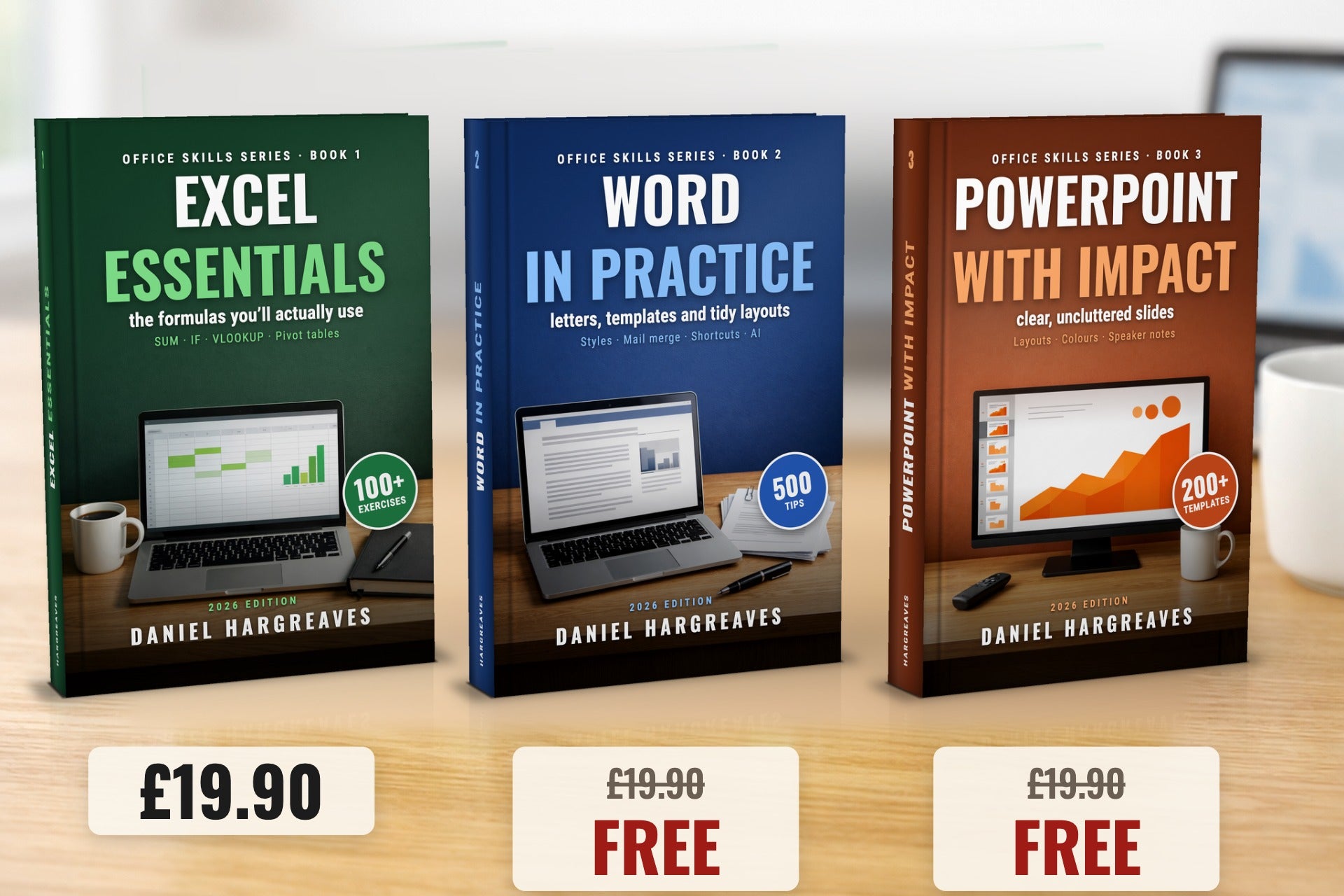
Buy “Excel Essentials” and, for a limited time, get “Word in Practice” and “PowerPoint with Impact” free.
Start where you are
Most of us picked up Office by trial and error. That works fine – until you inherit a spreadsheet nobody can explain, or the numbering in a document goes haywire the moment you add a heading.
Each book covers one program in short lessons: a real-life office task, the steps shown on screen, then an exercise you do yourself. Everything is explained from the first click.
Within a few lessons, you’ll know which function the job needs – and start finishing tasks that used to drag on.
The bundle price won’t be around for long.
Who is this collection for?
It’s for you if…
- you’re starting from scratch or only know the basics
- you want routine jobs done in a few clicks
- you’re changing jobs and want your Office skills to hold up in an interview test
- you do your own invoices, price lists and pitches
- you want to know why a formula works, not just copy it
It’s not for you if…
- you’re a programmer looking for VBA macros or advanced data analysis
- you’re after a reference manual rather than a course
- you only need help with one specific feature and nothing else
📚 3 books in one collection – here’s what you get
- Book 1 – Excel Essentials: a seven-day plan that starts with a blank worksheet and works up to SUM, IF, VLOOKUP, charts and pivot tables – with more than 100 practical exercises.
- Book 2 (free) – Word in Practice: 500 tips, from heading styles and automatic tables of contents to letters, templates, mail merge and a CV that’s easy to read and quick to update.
- Book 3 (free) – PowerPoint with Impact: clear, uncluttered slides – layouts, colours, speaker notes and animations used sparingly, plus more than 200 ready-made templates.
- At a glance:
- More than 100 Excel exercises with answers
- 500 Word tips – from heading styles to mail merge
- More than 200 PowerPoint templates – pick one and drop in your own content
- A bonus video course – watch the trickier steps being done on screen
- Copilot, used well: prompts for Excel and Word, and how to check what the AI gives you
- Worked examples based on real office tasks – order lists, monthly reports, team meetings
What exactly will you learn?
Here’s what each book covers, in practical terms.
| Program | Once you’ve worked through these books, you’ll be able to |
|---|---|
| Excel | do calculations with SUM, AVERAGE and IF, look up data with VLOOKUP, and create charts, pivot tables and a clear dashboard |
| Word | use styles, insert an automatic table of contents, write reports and letters, and put together a professional CV and a persuasive cover letter |
| PowerPoint | plan the structure of a presentation, choose colours and fonts, use animations sparingly and present without reading off your slides |
| AI | ask Copilot the right questions and check its answers before you use them at work |
Look inside: VLOOKUP in 3 steps
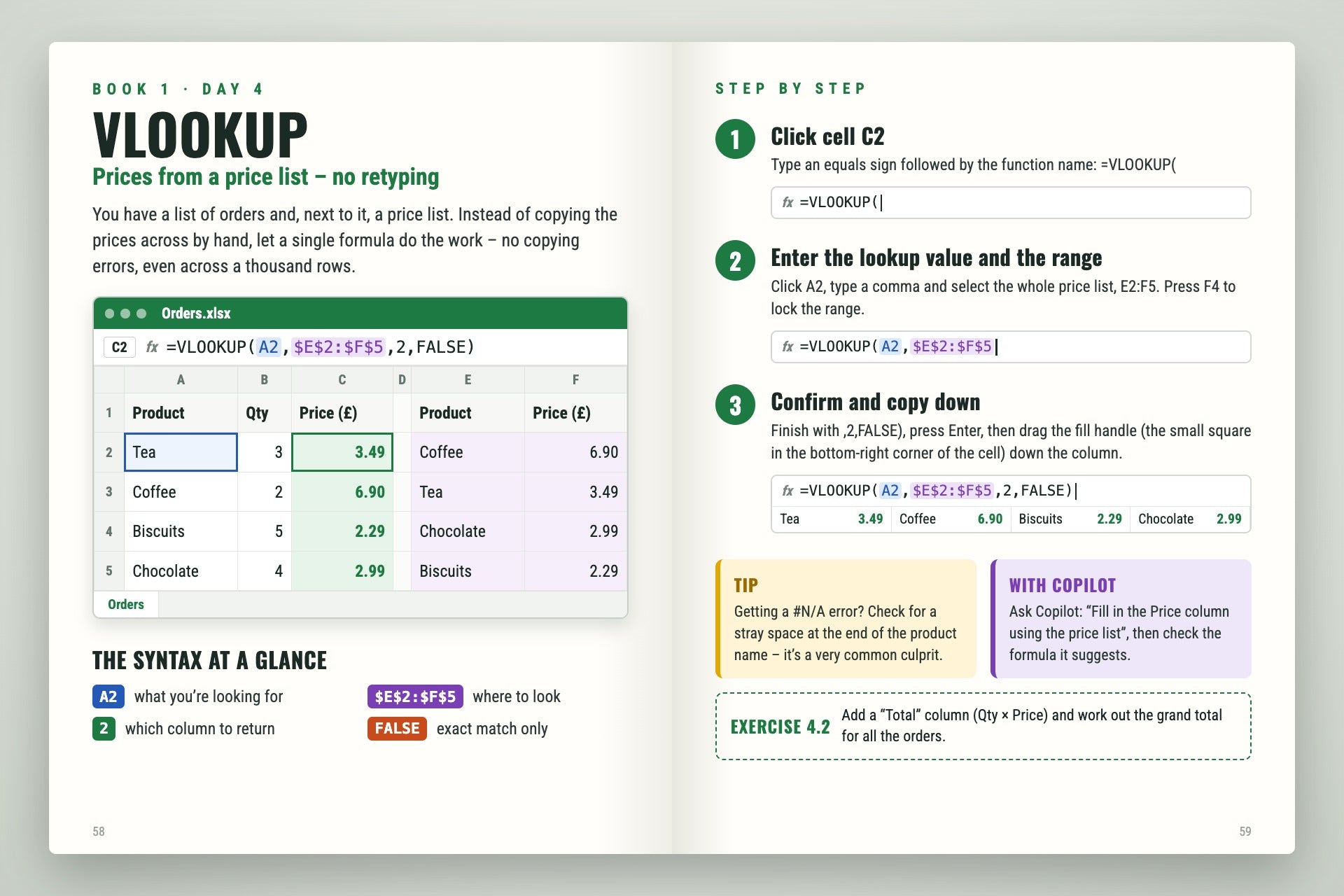
This is what a lesson in the first book looks like: a problem from everyday work, a formula explained step by step and, at the end, an exercise.
| Step | What you do |
|---|---|
| 1. Click the cell where you want the result | Type an equals sign followed by the function name: =VLOOKUP( |
| 2. Fill in the arguments | Click the cell with the product you’re looking up, type a comma, select the price list and press F4 to lock the range (an absolute reference). |
| 3. Finish off | Type a comma, the column number, another comma and FALSE, close the bracket and press Enter. Then copy the formula down by dragging the fill handle – the small square in the bottom-right corner of the cell. |
Excel in 7 days – your plan for the first week
| Day | What you learn |
|---|---|
| 1 | The worksheet, cells and your first spreadsheet |
| 2 | Formatting and simple calculations |
| 3 | SUM, AVERAGE and IF |
| 4 | VLOOKUP, sorting and filtering |
| 5 | Charts that make the numbers obvious |
| 6 | Pivot tables without the stress |
| 7 | Your first dashboard |
20–30 minutes a day is enough. You can learn Word and PowerPoint alongside it or later on – each book is a complete course in its own right.
What is this collection worth?
| Book | Contents | Value |
|---|---|---|
| Excel Essentials | Formulas, charts, pivot tables, more than 100 exercises | £19.90 |
| Word in Practice | Styles, letters, templates, CVs, 500 tips | £19.90 |
| PowerPoint with Impact | Layouts, colours, presenting, more than 200 templates | £19.90 |
| Total value | ||
| Your price today | You save £39.80 (67%) | £19.90 |
Excel, Word & PowerPoint 2026 from Scratch: 3 Books for the Price of 1
Four everyday jobs, done properly
👉 The order list: one VLOOKUP pulls in every price, and a pivot table totals the lot by region.
👉 The monthly report: heading styles, page numbers and a table of contents that updates itself.
👉 The team meeting: five clean slides built from a template, with notes so you never lose the thread.
👉 Your CV: a clear layout in Word that takes minutes to tailor for each application.
3 books for just £19.90
Start with lesson one
The first lesson is shorter than a tea break.
Yes, I want 67% off!£19.90 instead of £59.70, for a limited time only.
Frequently asked questions
Do I need any experience?
No. The books are written for complete beginners and for anyone who only knows the basics – whether you use Office at work, at college or university, or in your own business.
Which version of the software do I need?
The books cover versions 2016, 2019, 2021 and 2024, as well as Microsoft 365. Where the versions differ, this is clearly pointed out. (The Copilot features need Microsoft 365.)
Do the examples use UK settings?
Yes. All the examples are written for Excel with UK regional settings: commas between the arguments of a function, a full stop as the decimal point and prices in pounds.
Does all this work on a Mac too?
Yes. The key functions are the same, and where the Mac keyboard shortcuts are different, we give you both.
How much time do I need to set aside?
20–30 minutes a day is enough. The lessons are short, and you try out each step at the computer straight away.
What’s in each book?
Excel Essentials: formulas, functions, charts, pivot tables and more than 100 exercises. Word in Practice: documents, reports, CVs and 500 tips. PowerPoint with Impact: slide design, presenting and more than 200 templates.
How can I pay?
By card or any of the other payment methods shown at checkout. Payment is safe and encrypted.
How can I contact you?
Email us at hello@librova.eu – we’ll get back to you as soon as we can.
How do I receive the books?
These are digital products: you get access to everything straight after your purchase.